
Why EPUB and not PDF?
EPUB is reflowable: the text adapts to the screen, so you can pick the font size on a 6-inch e-reader or a phone. A PDF of a webpage keeps the desktop layout, with tiny text and broken columns on small screens. EPUB opens in Apple Books, Google Play Books, Kobo, PocketBook, Boox, KOReader and Calibre, and goes to a Kindle through Send to Kindle.
Option 1: an online URL to EPUB converter
Our Webpage to EPUB converter works in any browser, on a computer or a phone, with nothing to install.
- Pros: paste one or many addresses; Mozilla Readability (the engine of Firefox Reader View) keeps only the article; images and a cover are included; several articles become one book with a table of contents.
- Cons: our server has to fetch the page, so pages behind a login, a paywall or bot protection don't work directly — save them as HTML first (see below).
Option 2: Calibre
Calibre is a free desktop e-book manager for Windows, macOS and Linux. Its Fetch news button downloads sites through "recipes": hundreds are built in, and Add a custom news source lets you build one from a site's RSS feeds and schedule it. Calibre can also add a saved HTML file and convert it to EPUB.
- Pros: very powerful, scheduled downloads of whole news sites, full control over the conversion.
- Cons: a desktop install and a learning curve; recipes work with feeds rather than a single URL, and simple recipes can leave menus or clutter in the book.
Option 3: Pandoc
Pandoc is a command-line document converter. It accepts a web address instead of a file and fetches it itself, for example pandoc -f html -o article.epub https://example.com/article.
- Pros: scriptable, precise, great for clean HTML such as documentation you control.
- Cons: it converts the whole page — navigation, footers and sidebars included — because it doesn't detect the main article; you need a terminal.
Option 4: a browser extension
Extensions such as WebToEpub (Chrome and Firefox) run inside your browser and build the EPUB from pages you open.
- Pros: they see what your browser sees, including pages you're logged into; WebToEpub has parsers for many web-serial sites.
- Cons: you install an add-on with access to the sites you visit, they don't work on every phone browser, and site-specific parsers break when a site changes.
Step by step: save a webpage as EPUB with this converter
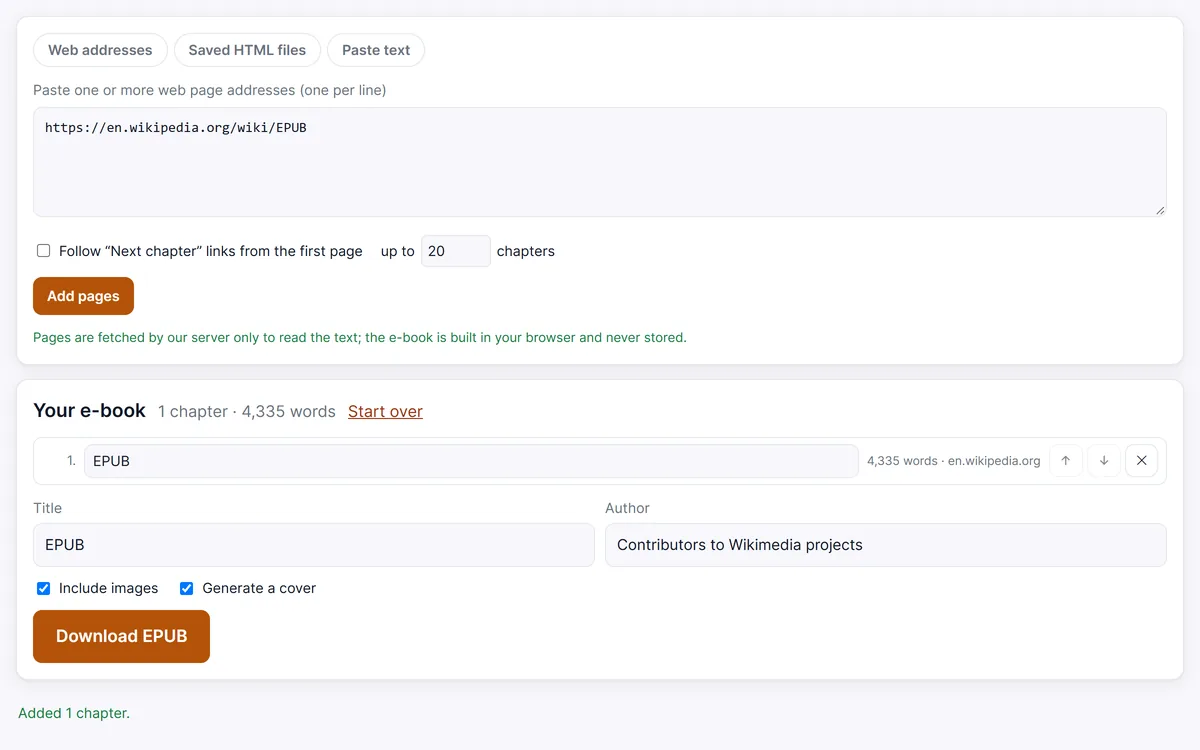
- Copy the address of the page you want to keep.
- Paste it into the Web addresses box below. For several pages, paste one address per line.
- Click Add pages. Each page becomes a chapter; rename, reorder or remove chapters in the list.
- Set the book title and author. Leave Include images and Generate a cover on, or turn them off for a smaller file.
- Click Download EPUB and open the file on your reader.
For serialized fiction, the Web novel to EPUB page follows the Next chapter links for you.
Pages behind a login or Cloudflare
If a page needs you to sign in, or a bot check (such as Cloudflare's) stops our server, the converter reports an error. Open the page in your browser instead, use Save page as… → Web page, HTML only, and add the file on the HTML to EPUB page. The file is read in your browser and never uploaded. The e-books are for personal reading: respect each site's terms and don't share other people's work.
Save a webpage as EPUB now
Open web pages you saved with Save page as… → Web page, HTML only. Several files become several chapters, sorted by file name.
Pages are fetched by our server only to read the text; the e-book is built in your browser and never stored.
Your e-book
Frequently asked questions
What is the easiest way to convert a URL to EPUB?
Paste the address into an online converter like the one on this page and click Download EPUB. There is nothing to install and no account.
Can I save several articles into one EPUB?
Yes. Paste several addresses, one per line; each becomes a chapter, in the order you choose.
Are images kept?
Yes, images inside the article are included and converted where needed so e-readers can show them. You can turn images off for a lighter file.
Do you keep the pages or my e-book?
No. Our server fetches a page only to hand its HTML to your browser; nothing is stored. Text extraction and the EPUB are made in your browser.