
Why read articles on an e-reader?
A 5,000-word long read is tiring on a laptop and full of distractions on a phone. On e-ink there are no notifications or ads, the battery lasts for weeks, and you can read outside, offline, on a plane. The trick is getting the article off the web and into a format the reader understands — EPUB.
Build a reading list and make one book a week
- During the week, collect the addresses of articles you want to read in a note on your phone or computer.
- Once a week, paste them all into the converter below, one per line, and click Add pages.
- Give the book a title you will recognise in your library, such as "Reading list – 9 November", and click Download EPUB.
- Transfer the file to your reader with one of the methods below.
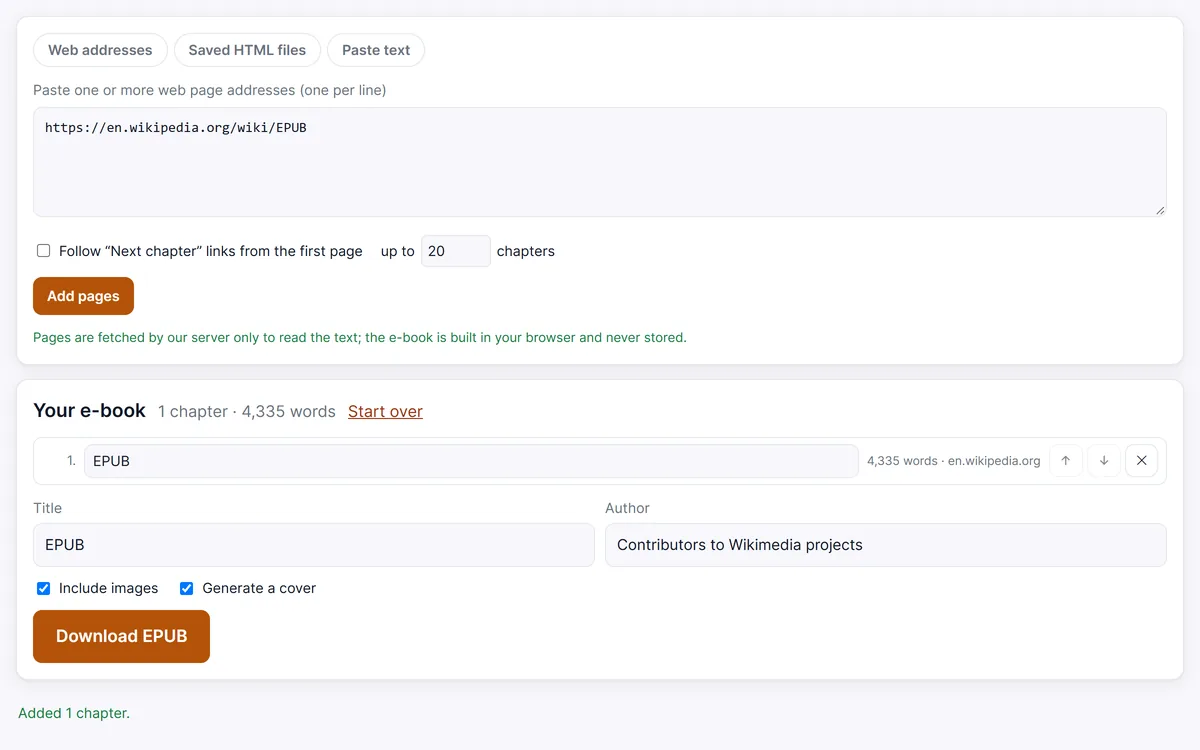
Each article becomes a chapter with its own entry in the table of contents, and the original address is printed at the end of each chapter, so you can go back to the source later.
How to get the EPUB onto your device
- Kobo. Connect the reader to a computer with its USB cable, tap Connect, and copy the EPUB onto the drive that appears; eject it and the book is imported. Some models can also sync a cloud folder: Kobo's Google Drive feature works on the Libra Colour, Sage, Elipsa, Elipsa 2E and Forma, and Dropbox is supported on selected models — link the reader at
kobo.com/googledriveorkobo.com/dropboxand put files in the Rakuten Kobo folder. - Kindle. Kindles don't open EPUB files copied over USB. Use Amazon's free Send to Kindle — upload on the website, e-mail the file to your
@kindle.comaddress, or share it from the Kindle app. Our guide How to send a webpage to Kindle walks through it. - PocketBook. Copy the EPUB over USB, or set up Send-to-PocketBook on the device: it gives you a personal address ending in
@pbsync.com, and books you e-mail there download when the reader is on Wi-Fi. - Boox. Copy over USB, or use Boox's own transfer tools — BOOXDrop on the device or the send2boox website (
push.boox.com) — to send files from your computer or phone. - Apple Books. On iPhone or iPad, open the EPUB in the Files app and share it to Books. On a Mac, open the file with the Books app.
- KOReader and other apps. Any reader app that opens EPUB works; put the file in a folder the app can see.
Formatting tips for e-ink
- Keep books small. Ten to thirty articles per book open quickly; very large books are slow to page through on older readers.
- Decide on images. Photos show in greyscale on most e-ink screens. Charts and diagrams are worth keeping; for pure text, turn Include images off to get a lighter file.
- Use the cover. A generated cover with the book title makes the reading list easy to spot among your other books.
- Let the reader do the typography. The EPUB has no fixed fonts or page layout, so set the font, size, line spacing and margins in your reader's settings.
- Clean up chapter titles. Rename long headlines in the chapter list before downloading so the table of contents stays readable.
When an article can't be fetched
Pages behind a login or bot protection can't be downloaded by our server. Save them in your browser with Save page as… → Web page, HTML only and add them on the HTML to EPUB page, then transfer the EPUB as usual. Use the books for personal reading and support the writers you enjoy.
Turn your reading list into an EPUB
Open web pages you saved with Save page as… → Web page, HTML only. Several files become several chapters, sorted by file name.
Pages are fetched by our server only to read the text; the e-book is built in your browser and never stored.
Your e-book
Frequently asked questions
Which file format should I use for an e-reader?
EPUB. It is the standard format for Kobo, PocketBook, Boox, Apple Books and reading apps, and Kindle accepts it through Send to Kindle.
Can I read the articles without an internet connection?
Yes. Once the EPUB is on the device, everything — text and images — is inside the file.
Do links in the articles still work?
Links are kept as full web addresses, so they open if your reader has a browser and is online. The source address of each article is also printed at the end of its chapter.
Can I read the EPUB on a Kindle?
Yes. Send the file with Amazon's Send to Kindle (app, website or e-mail), which accepts EPUB and converts it for your Kindle.